01
Connect channel signals
Bring competitor channels, comments, brand voice, and reusable channel context into one shared Space.

Plan videos, write scripts, design thumbnails, and repurpose every upload from one shared channel HQ.
A YouTube team does not need one more script generator. It needs a repeatable operating system where channel context, weekly research, video production, and distribution work stay connected.
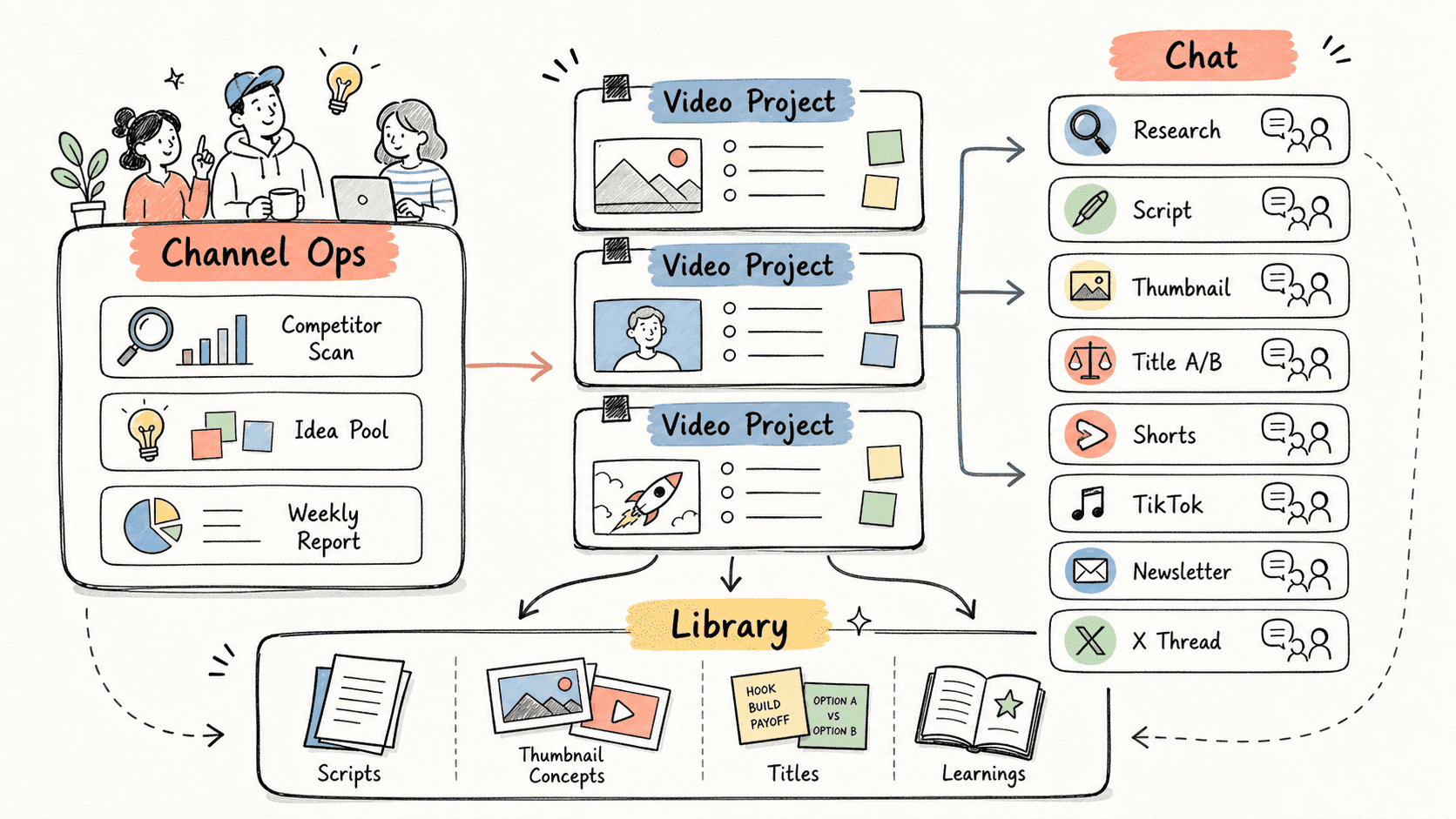
Kollab turns a channel into a Space, keeps long-running operations in a Channel Ops Project, and gives every video its own Project with focused Chats for research, scripting, thumbnails, titles, and platform adaptations.
Revisa el flujo de trabajo una vez y luego añade tus propios roles, fuentes y entregables.
Bring competitor channels, comments, brand voice, and reusable channel context into one shared Space.
Turn a chosen idea into a Video Project with focused Chats for research, script, thumbnails, titles, and distribution.
Push scripts, title patterns, thumbnail briefs, and post-publish learnings back into the channel library for the next cycle.
Kollab keeps every task focused while preserving the channel context around it.
| Scattered workflow | With Kollab | |
|---|---|---|
| Channel context | Voice notes, audience insights, and competitor lists live in docs, chat threads, and personal memory. | The Space keeps channel context available to every Project and Chat. |
| Weekly planning | Operators manually check channels, paste links, and rebuild the opportunity list before each meeting. | Channel Ops Chats can run on schedule and turn signals into a reusable idea pool. |
| Video production | Research, scripts, thumbnails, titles, and repurposing work split across separate tools. | One Video Project groups all production Chats around the same topic and assets. |
| Learning loop | After publishing, lessons are easy to lose before the next video starts. | Outputs and notes stay in the library so the next cycle starts with better context. |
| Total time | Many tools and isolated conversations | One channel HQ with connected work |
A Video Project is not just a chat history. It becomes a reusable package of decisions, drafts, and distribution assets.
Topic
Script
Creative
Distribution
Explore las páginas de funciones relacionadas para ver qué capas del producto y herramientas hacen que este caso de uso sea repetible para un equipo.
Plan videos, write scripts, design thumbnails, and repurpose every upload from one shared channel HQ.
Copia el prompt de configuración en Kollab, sustituye los marcadores por el contexto de tu equipo y ejecútalo como una tarea revisable en tu espacio de trabajo.
A weekly YouTube operating packet with 5 competitor opportunities, 10 video ideas, 3 production candidates, one video project plan, script brief, thumbnail brief, title A/B list, and repurposing plan for Shorts, TikTok, newsletter, and X.
No. El flujo de trabajo está diseñado para generar primero borradores, briefs, artefactos o actualizaciones de bases de datos revisables, de modo que tu equipo pueda aprobar el resultado antes de publicar o modificar nada.
Plan the channel, produce the video, and keep the learning loop in one shared HQ.
Run