01
Define evaluation criteria
Tell Kollab which AI tool categories the team is evaluating and which purchasing fields matter: price, account status, use case, alternatives, trial owner, and renewal recommendation.
Use Kollab to build an AI tool evaluation template for pricing, trials, subscription status, alternatives, and renewal recommendations in Notion.
Built for product teams, operations teams, technical leads, and procurement owners who need to manage AI tool evaluation, purchasing, and subscription reviews. It is especially useful when teammates have tried tools like ChatGPT, Claude, Cursor, Midjourney, and Runway, but trial feedback, paid seats, renewal dates, and use cases are scattered across Slack, meeting notes, and personal docs.
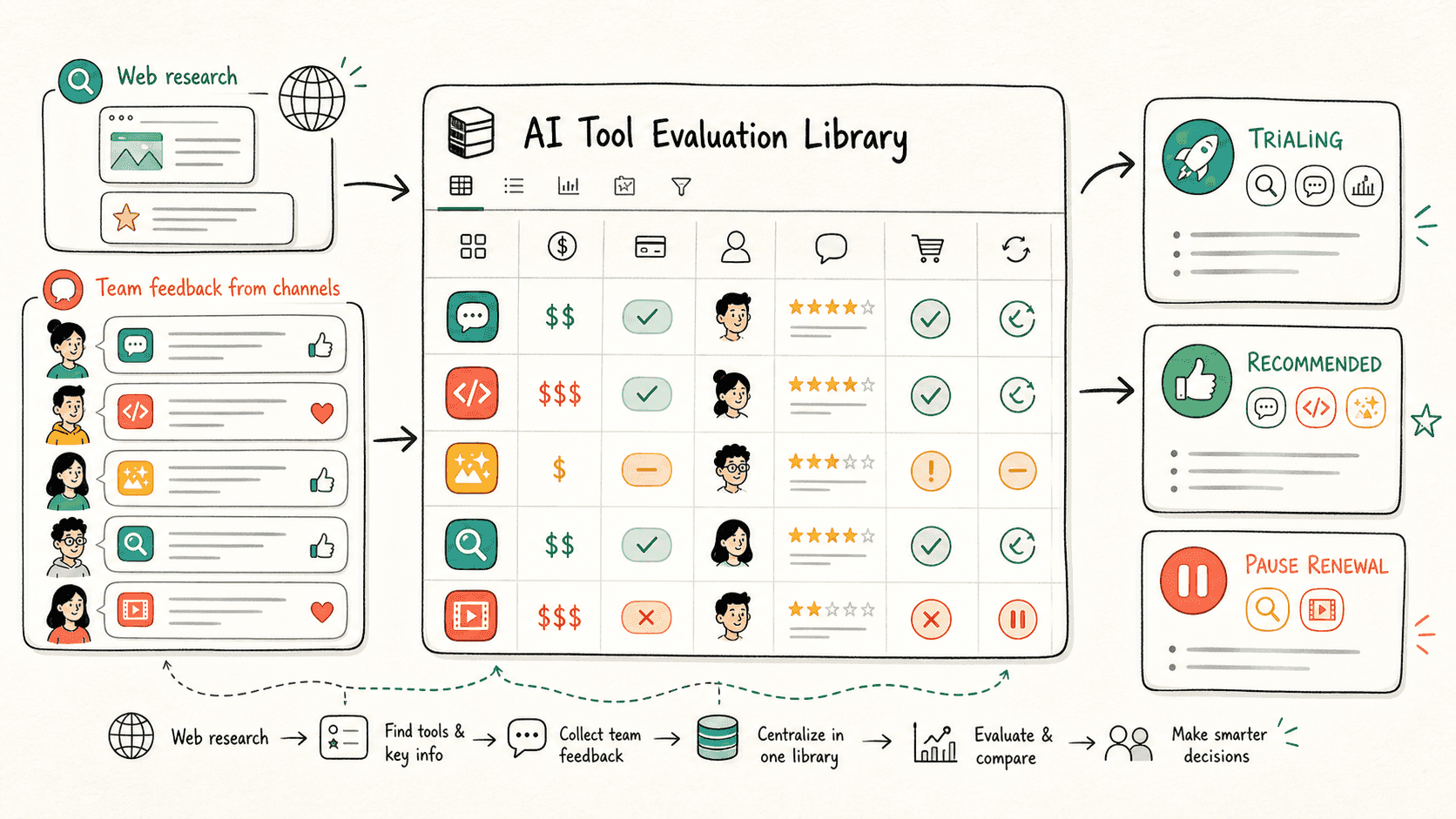
Read through the workflow once, then swap in your own roles, sources, and outputs.
Tell Kollab which AI tool categories the team is evaluating and which purchasing fields matter: price, account status, use case, alternatives, trial owner, and renewal recommendation.
Kollab searches official sites, pricing pages, docs, and public reviews, then writes capabilities, pricing, team fit, and alternatives into a Notion AI tool library.
Slack Connector extracts real tool feedback, issues, recommendations, and purchasing concerns from team channels and attaches them to the matching tool entries.
Turn AI tool research, Slack trial feedback, subscription cost, and purchasing decisions into one repeatable team evaluation workflow.
| Manual workflow | With Kollab | |
|---|---|---|
| Collect tool information | Search official sites, pricing pages, and reviews one by one, and the data goes stale quickly. | Searches public information and writes structured entries into Notion. |
| Collect team feedback | Keep asking in Slack who has tried each tool, then record scattered replies by hand. | Extracts trial feedback and purchasing concerns from Slack automatically. |
| Manage subscription cost | Paid seats, monthly cost, and renewal timing live across sheets and personal notes. | Tracks subscription status, cost, owner, and review date per tool. |
| Purchase and renewal decisions | Build a spreadsheet before each meeting and manually keep it updated. | Creates views for purchase, trial, alternative, and cancel or pause renewal decisions. |
| Total time | Half a day to set up, ongoing upkeep | Minutes to build, one request to update |
The AI tool library is not just a list. It becomes a reusable decision asset for purchasing, trials, and renewal reviews.
Profile
Feedback
Cost
Decision
Follow the related capability pages to see which product layers and tools make this use case repeatable for a team.
Use Kollab to build an AI tool evaluation template for pricing, trials, subscription status, alternatives, and renewal recommendations in Notion.
Copy the setup prompt into Kollab, replace the placeholders with your team context, then run it as a reviewable task in your workspace.
A Notion AI tool evaluation library for purchasing and renewal decisions, with pricing, subscription status, trial owners, team feedback, alternatives, and recommendations.
No. The workflow is designed to produce reviewable drafts, briefs, artifacts, or database updates first, so your team can approve the result before anything is published or changed.
Let Kollab handle research, feedback, purchasing, and renewal decisions.
Try for free