Workflow sancısından çıkış: Kollab ekibinin her gün kullandığı 4 gerçek AI workflow
Kollab Bot ile ekiplerin grup sohbetinden bug bildirmeyi, günlük rapor yazmayı, kod sorularını yanıtlamayı ve GitHub Issues kapatmayı nasıl yaptığını görün.
Temel Çıkarımlar
Neden Kollab'ye İhtiyacımız Var: Daha Fazla Araç, Daha Parçalı İşbirliği
Her iş günü grup sohbetlerindeki dağınık mesajlarla başlar. İş ekipleri bug ekran görüntülerini, özellik ayrıntılarıyla ilgili satış ping mühendisliklerini atıyor ve günün sonunda herkes neyi başardıklarını ve daily report'ye nelerin eklenmesi gerektiğini hatırlamaya çalışıyor...
Konuşmalar IM'de gerçekleşir, ancak bu konuşmaları eyleme dönüştürülebilir Issues'ye veya görevlere dönüştürmek yine de sistemler arasında manuel olarak kopyalayıp yapıştırmayı gerektirir.Ne kadar çok araç eklersek ekip işbirliği o kadar parçalı hale gelir.
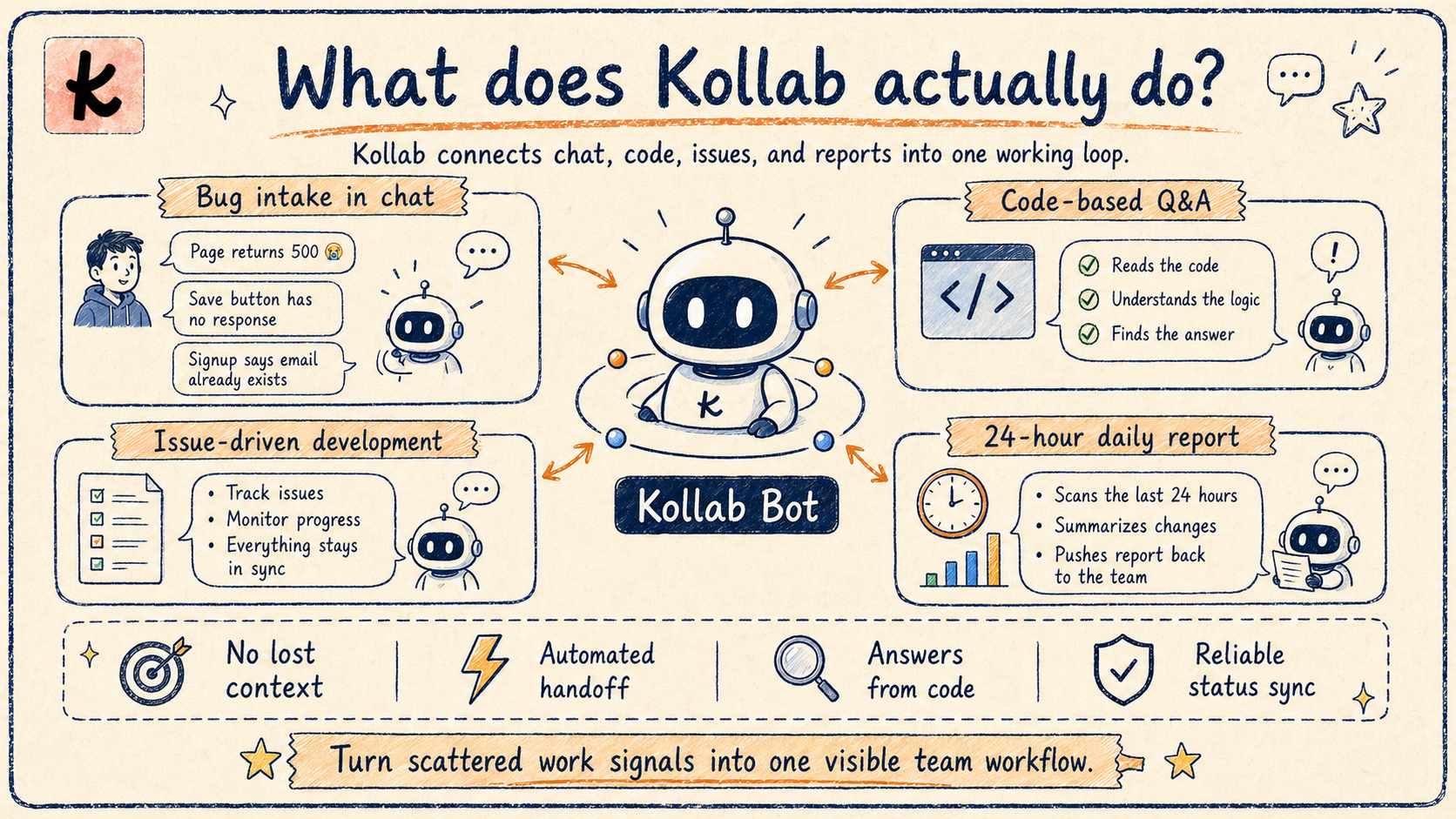
Kollab bu acı verici "ara bölgeyi" devralmak için var. Ekipleri iletişim biçimlerini değiştirmeye zorlamaz; bunun yerine görünmez bir bağlayıcı görevi görür ve IM'yi, kod depolarını ve proje yönetimi akışlarını kusursuz bir şekilde birleştirir.
İşte Kollab ekibinin her gün gerçek AI workflows olarak kullandığı 4 senaryo.
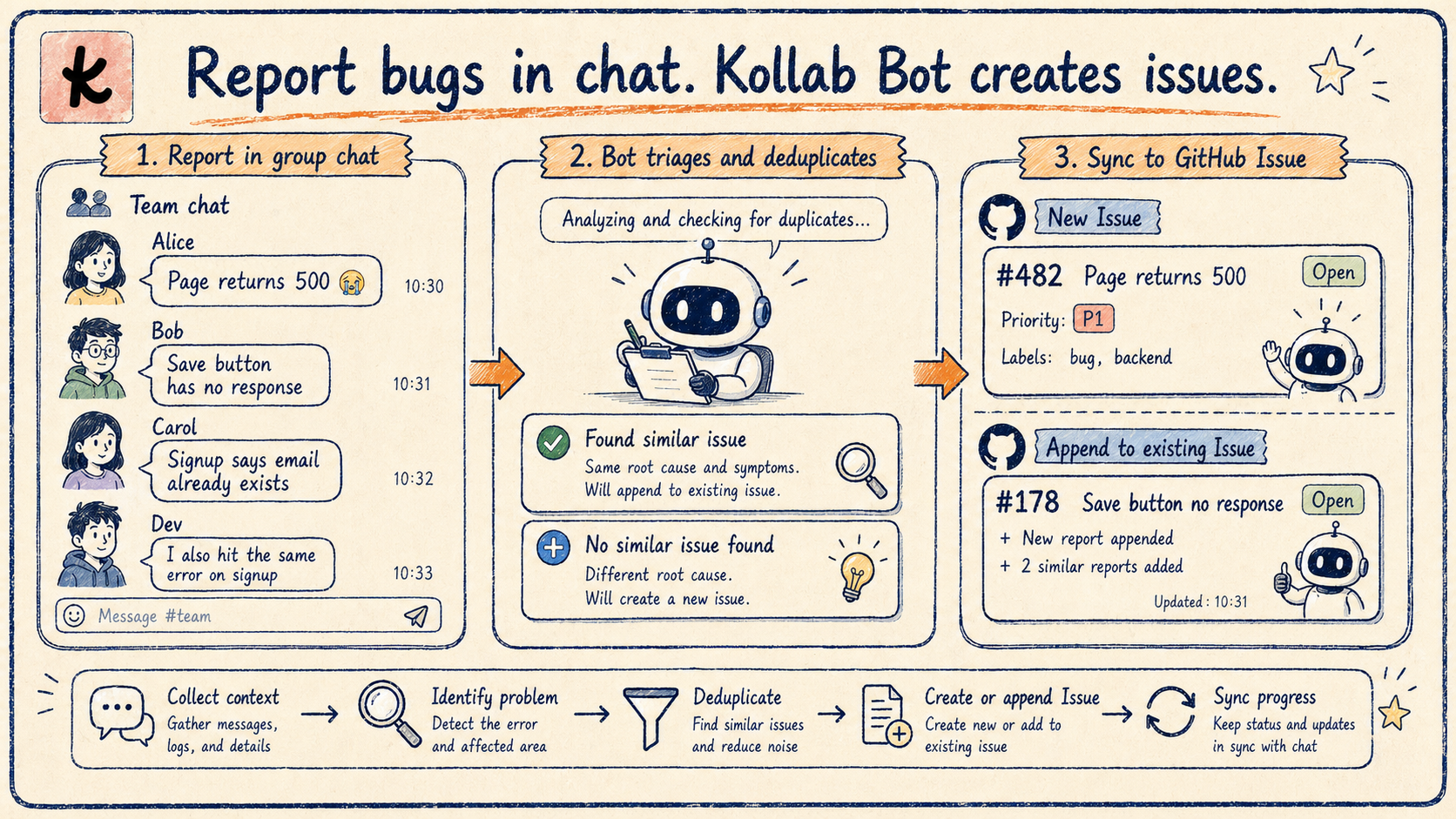
Senaryo 1: Grup Sohbetindeki Hata Raporları Otomatik Olarak GitHub Issues'ye Nasıl Dönüştürülür?
Bottom hattı:@Kollabbug'yi bildirmek için sohbete girin ve Bot otomatik olarak bağlamı doğrular, tekilleştirir ve mevcut bir GitHub Issue oluşturur veya ona ekler; üstelik bunların tümünü sohbet penceresinden çıkmadan yapar.
Sohbette bugs'yi bildirmek en düşük soruna neden olur ve en sık gerçekleşir.herhangi biriekran görüntüsü atabilir. Ancak geleneksel sorun şudur:
Hızlı bir "Bir HATA var" mesajı, takip gerektirmez ve hiç kimse sorunları toplamak için tüm gün sohbeti izleyemez;
Sonunda bir Issue oluşturulduğunda bile, çoğu zaman orijinal bağlamdan yoksundur;
Aynı bug, farklı sohbetlerdeki farklı kişiler tarafından rapor ediliyor ve bu da yinelenen girişlere yol açıyor.
Kollab Bunu Nasıl Ele Alır?
Doğrudan@Kollabbir sorunu bildirmek için bir çalışma grubunda yer alır ve Bot bunu şu şekilde işler:
Bağlamın bütünlüğünü kontrol eder: kullanıcının yeterli bilgi sağlayıp sağlamadığını belirler; değilse çoğaltma adımlarını, bağlantıları, ekran görüntülerini veya açıklamayı ister;
Tekilleştirme araması: ilk önce GitHub'de mevcut benzer Issues'yi arar;
Oluştur veya ekle: yeni bir Issue oluşturur veya raporu mevcut bir rapora ekler.
Mühendisler çalışmaya başladığında,AJANLAR.mddepodaki kural Issues aracılığıyla tarar, bunları düzenler ve bir liste oluşturur; mühendisler doğrudan temizleme görevlerine geçebilir.
Geleneksel Akış ve Kollab Akış
| Adım | Geleneksel Yaklaşım | Kollab Yaklaşımı |
|---|---|---|
| Bağlam koleksiyonu | Manuel takip, bilgileri bir araya getirme | Bot eksik alanları otomatik olarak tanımlar ve sorar |
| Veri tekilleştirme kontrolü | Bellekten veya tamamen atlandı | Mevcut GitHub Issues'yi otomatik olarak arar |
| Issue'yi oluşturun | GitHub'ye kopyala-yapıştır | Bir@Kollabve bitti |
| Mühendis pikap | Issue listesinde manuel olarak kaydırma yapın | AJANLAR.mdkuralları otomatik olarak getir ve düzenle |
Tüm akış, arada hiçbir ekstra adım olmadan "IM'de rapor → mühendis temizler" şeklinde basitleşir.bilgi kaybı yok, mükerrer giriş yok, herhangi bir proje yönetim aracını açmaya gerek yok.
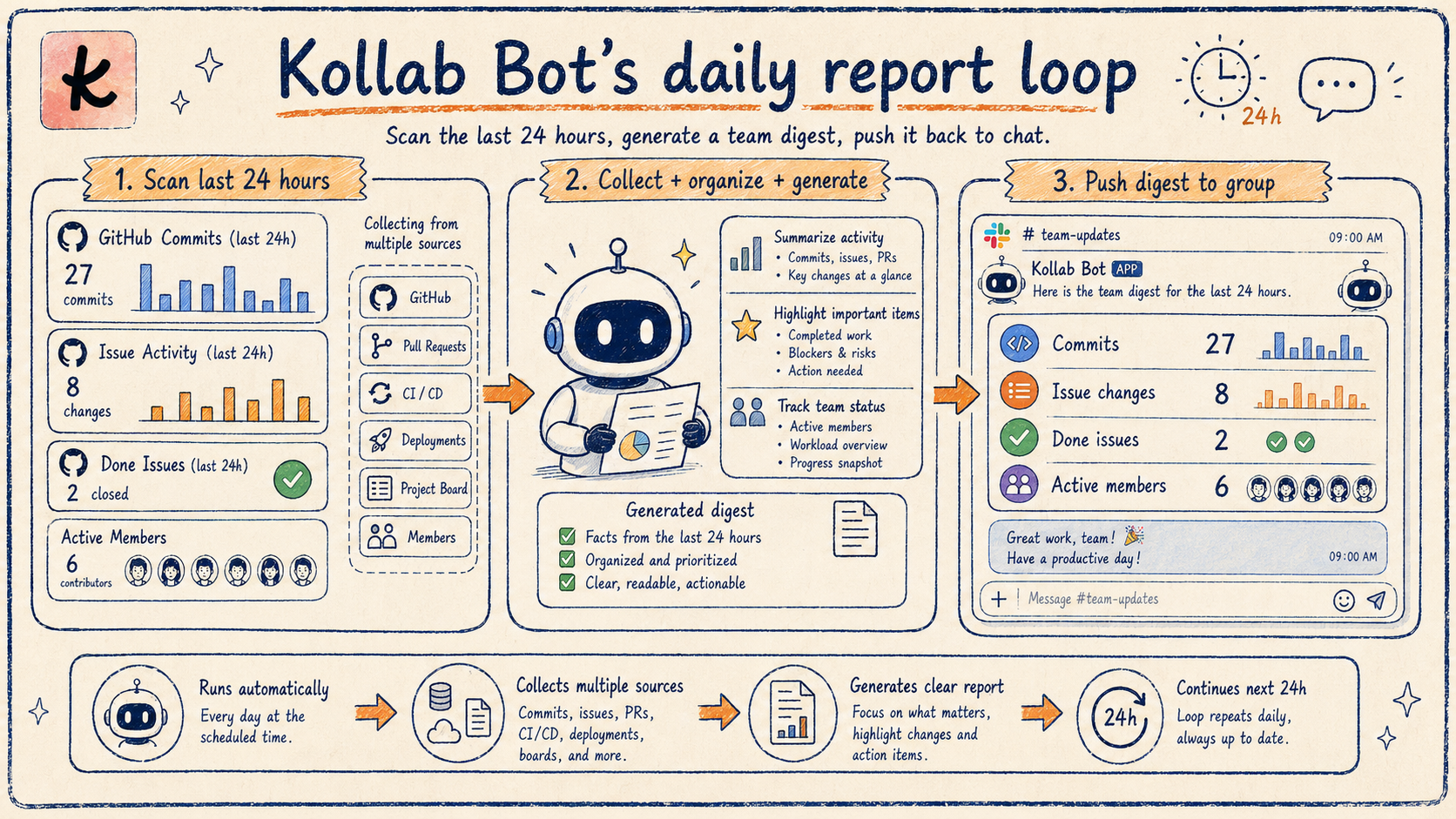
Senaryo 2: Günde Yüzlerce İşlem — Günlük Raporları Nasıl Zahmetsiz Hale Getirirsiniz?
Bottom hattı: Hafta içi her gün saat 17.00'de Kollab Bot, açık Issues ile birlikte son 24 saatteki tüm commit'leri otomatik olarak getirir, bunları analiz eder ve belirlenen IM grubuna yapılandırılmış bir rapor iletir.
Kollab'de daily report'ler mevcuttur çünkü yineleme hızı o kadar hızlıdır ki her günün iş yükü daha önce hayal bile edilemezdi. Ekiplerin üzerinde çalıştıkları şeyleri ve keşfettiklerini paylaşmak için bolca zamanları vardı; AI bu hacmi kat kat artırdı.Kollab'nin kod tabanı her gün neredeyse yüze yakın yeni commit kazanıyor. Bu bir iki cümleyle anlatılabilecek bir şey değil.
Kollab Bunu Nasıl Ele Alır?
Artık hafta içi her gün saat 17.00'de,Kollab Bototomatik olarak:
Son 24 saatteki tüm commit'leri getirir;
Bunları açık Issues'ye göre analiz eder, düzenler ve özetler;
Yapılandırılmış bir rapor oluşturur ve bunu belirlenen IM grubuna iletir.
Herkes günün yineleme durumunu ve bundan sonra ne yapılması gerektiğini anında bilir.Hiçbir şey unutulmaz; Kollab her ayrıntıyı titizlikle takip eder.
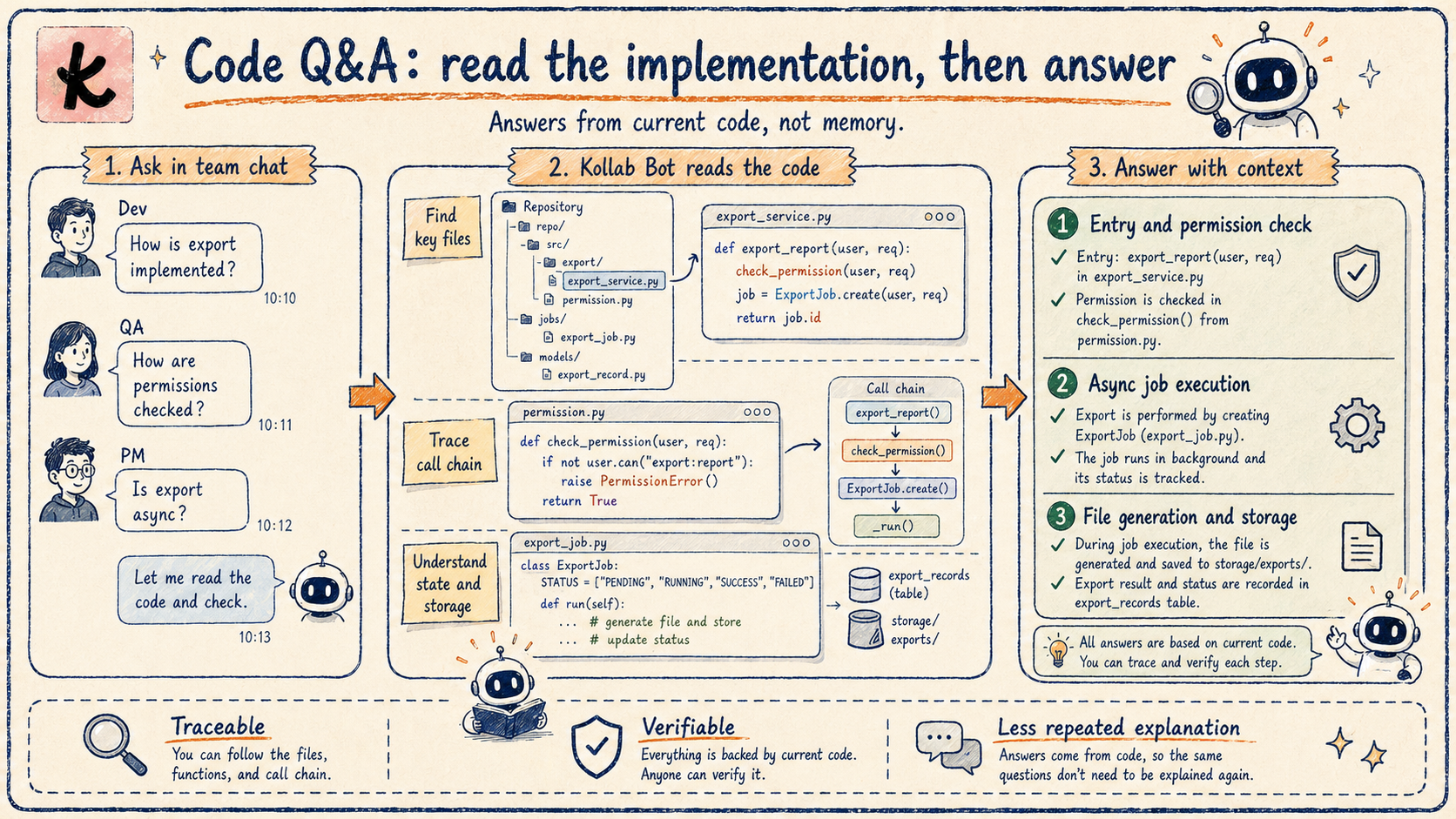
Senaryo 3: Özellik Uygulama Ayrıntıları Soruluyor mu? Kollab Önce Kodu Okur
Bottom hattı: Kollab Bot, GitHub deposuna bağlanır, böylece ekip üyeleri özellik mantığını doğrudan sohbette sorabilir; Bot kaynak kodunu okur ve yanıtları vererek mühendisleri tekrarlanan açıklamalardan kurtarır.
Kollab Bot, Kollab'nin GitHub kod tabanına bağlanır.Şirketteki herkes özellik mantığı hakkında soru sorabiliriçerik araştırması, özellik optimizasyonu planlaması veya başka herhangi bir şey için istediğiniz zaman. Uygulamayı anladıktan sonra iyileştirme önerilerini doğrudan Issues olarak dosyalayabilirler.
Satış Senaryosu: Müşteri Sorularına Işık Hızında Yanıt
En sık kullanılan durum, satış temsilcilerinin müşteri sorularını alıp sormalarıdır.@Kollabdoğrudan:
Belirli bir özellik müşterinin ihtiyacını karşılayabilir mi?
Mevcut özelliklere dayalı bir müşteri çözümü tasarlayın;
Belirli bir özellik için tam uygulama mantığı nedir?
Bu sadece hızlı olmakla kalmıyor, aynı zamanda mühendisleri tekrarlanan açıklamalardan da kurtarıyor. Orta kişi çevirisi yok anlamına gelirherhangi bir soru, herhangi bir zamanda sonsuza kadar takip edilebilir.
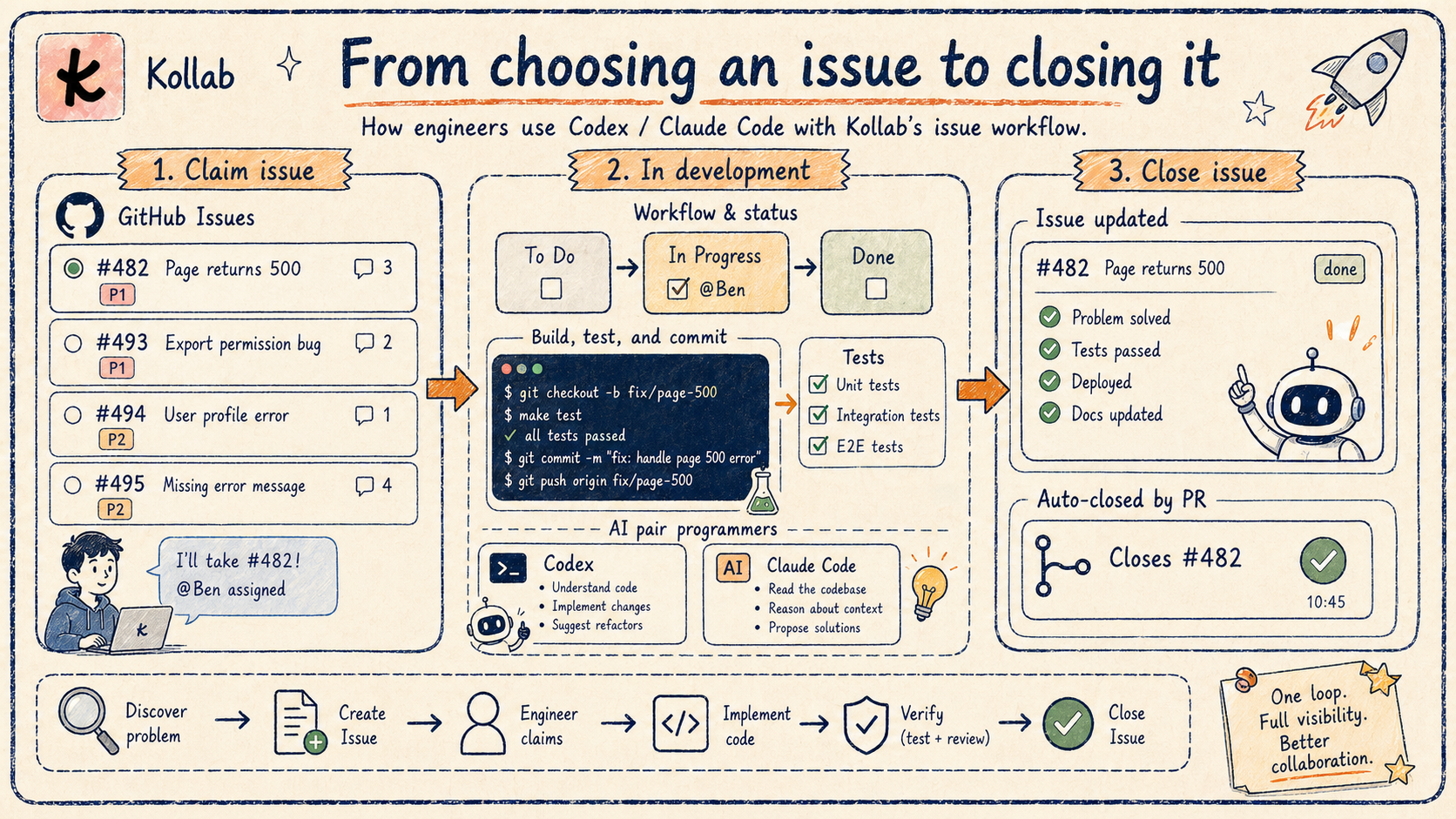
Senaryo 4: Geliştirici Kodu Gönderiyor—Issue Durumu Otomatik Olarak Nasıl Kapatılıyor?
Bottom hattı: İçinde tanımlanan kurallar aracılığıylaAJANLAR.md(sembolik bağlantılıCLAUDE.md), kod tabanı, bir görevi yürütmeden önce otomatik olarak Issues'yi tarar ve tamamlandıktan sonra commit'yi bağlar ve Issue'yi kapatır; herhangi bir web sayfasını manuel olarak açmanıza gerek yoktur.
Issue'nin durumu ve gerçek gelişimi, özellikle herkes meşgul olduğunda çoğu zaman senkronize olmaz. İnsanlar sıklıkla proje yönetimi araçlarını gözden kaçırıyor ve Issue durumunu güncellemeyi unutuyor.
Kollab Bunu Nasıl Ele Alır?
Kollab her şeyi kusursuz hale getiriyor. Tam döngü şöyledir:
Sohbet raporu→ otomatik olarak GitHub Issue olur (Senaryo 1);
AJANLAR.mdrepoda kuralları tanımlar: bir görevi yürütmeden önce Issues'yi tarayın, eşleşen görevi bulun ve durumunu güncelleyin;Görevi tamamladıktan sonra, commit'yi bağlayın ve Issue'yi otomatik olarak kapatın.
Not:CLAUDE.mdsembolik bağlantılarAJANLAR.mdClaude Code ve diğer AI kodlama yardımcılarının aynı kural setini paylaşmasını sağlamak.
Artık herhangi bir web sayfasını açmamıza gerek kalmıyor.Herkes yalnızca kendi çalışma tezgahına ve nihai çıktılara odaklanır.
Bonus: Ekibiniz için Özel Kollab Bot Nasıl Oluşturulur?
Yukarıdaki 4 workflows, Kollab'nin kendi uygulamasıdır ancak her takımın farklı ihtiyaçları vardır. Bazı ekipler müşteriye yönelik bir destek Bot ister; diğerleri kontrol panellerini izleyen bir analitik Bot'ye ihtiyaç duyar; bazılarının sadece toplantı notları alan bir asistana ihtiyacı var.Kollab, Bot'nin kişiliğini önceden belirlemez; tanım gücünü ekibinizin ellerine verir.
Yaratılışta: Bir Bilgi İstemi Giriş Kutusu Her Şeyi Tanımlar
Kollab Bot oluşturma iletişim kutusunda şunları belirtebileceğiniz bir bilgi istemi giriş kutusu vardır:
Kişilik: Kim bu Bot? (örneğin, "Siz bir müşteri başarı destek asistanısınız")
İş akışı: X tipi sorunlar nasıl ele alınır, hangi MCP'lerin çağrılacağı, hangi BECERİLERİN kullanılacağı
Ton ve sınırlar: Yanıtlar resmi mi yoksa gündelik mi olmalı? Hangi talepler kapsam dışıdır?
İstem, Bot'nin "iş sözleşmesidir". Bot kaydedildiğinde bu kurallara göre çalışır. Yukarıdaki 4 senaryodaki belirli davranışların tümü komut istemi aracılığıyla ayarlanabilir.
Yineleme Sırasında: Bot'nin İstemini IM'den Güncelleyin
Daha da iyisi,İstemi güncellemek için kontrol paneline geri dönmeniz gerekmez.IM'deki Bot'ye şunları söylemeniz yeterli:
"Bundan sonra fiyatlandırma sorularını kendinize yanıtlamak yerine satışa yönlendirin; isteminizi güncelleyin"
"Yanıt vermeden önce en son ürün belgelerini kontrol edin; isteminizi güncelleyin"
"Tonunu biraz gevşetin, çok fazla destek botuna benziyorsunuz; isteminizi güncelleyin"
Bot bu geri bildirimi anlar ve bunu kendi komut istemine geri yazar. Bir dahaki sefere@-bahsedildiği gibi, yeni kurallara göre hareket eder. BuBot'nin yineleme hızını ekibinizin sorunları keşfetme hızıyla aynı hizaya getirir— artık "not edin ve daha sonra düzeltin" yüküne gerek yok.
Bu Neden Önemli?
Geleneksel Bot yapılandırması, bir mühendisin veya yöneticinin bir kontrol panelini açmasını, yapılandırmayı değiştirmesini ve yeniden konuşlandırmasını gerektirir. Kollab'nin felsefesi şudur:Sorunu kim bulursa çözer.Satış ekibi Bot'nin yanlış yanıtlar verdiğini fark ederse, sohbette tek bir mesajla sorunu anında düzeltiyorlar.
Kapanış: İşbirliğinin Özü Akış Durumunuzu Kesintiye Uğratmamaktır
Kollab yepyeni bir çalışma yöntemi icat etmedi. Piyasadaki her workflow çözümünün bir öğrenme eğrisi vardır ve her ihtiyacı asla karşılayamaz.insanlar aracı araçlar yerine doğrudan iletişim kurma konusunda daha rahatlar.
Kollab, takım parçalanmasının çok sıkıcı hale getirdiği zahmetli "bağlantı işini" otomatik hale getirir. bugs'yi raporlamak, daily report'leri yazmak, kodu okumak veya Issues'yi izlemek olsun, eskiden birden fazla platform arasında geçiş yapmayı gerektiren adımlar artık en doğal yerde, yani sohbet penceresinde bir araya getiriliyor.
AI dönemi araçları, bilişsel yükü artırmamalı, azaltmalı; mevcut workflows'yi daha akıllı ve daha tutarlı hale getirmelidir. Bu sistem aracılığıyla yüksek hızlı yinelemenin heyecanını her gün yaşıyoruz ve bu "akış durumunun korunması" deneyiminin, daha fazla ekibin enerjilerini gerçekten önemli olan yere, yani değerli şeyler yaratmaya yöneltmesine yardımcı olacağını umuyoruz.
SSS
Kollab Bot nedir?
Kollab Bot, ekip grubu sohbet iletişimini, GitHub Issue yönetimini, kod Soru-Cevap ve günlük geliştirme ilerlemesini bir araya getirmek için tasarlanmış bir IM-yerel AI Agent'dir. Onun temel değeriekiplerin mevcut iletişim alışkanlıklarını değiştirmesini gerektirmemek— bunun yerine arka planda bilgi akışını otomatik olarak yöneten görünmez bir bağlayıcı görevi görür.
Kollab Bot'nin normal Slack Bot veya kurumsal WeChat botundan farkı nedir?
Geleneksel botlar çoğunlukla bildirim kanalları veya kural tabanlı tetikleyicilerdir (X al, Y gönder).Kollab Bot, bağlamı gerçekten anlayan bir AI Agent'dir: bug raporlarının eksiksizliğini değerlendirir, tekilleştirme için proaktif olarak GitHub'yi arar ve uygulama sorularını yanıtlamak için kaynak kodunu okur; bunların hiçbiri yalnızca tanımlanmış kurallarla gerçekleştirilemez.
Kollab, GitHub'ye nasıl bağlanır?
Kollab, GitHub'ye şu yolla bağlanır:MCP (Model Bağlam Protokolü). Yetkilendirildikten sonra Bot, Issues'yi okuyabilir/yazabilir, kodu okuyabilir ve commit'leri sorgulayabilir. Entegrasyon sürecinin tamamı standart MCP akışını takip eder; karmaşık Webhook yapılandırmasına veya özel entegrasyon katmanına gerek yoktur.
Yüzlerce commit için bir daily report çok zor olmaz mı?
Kollab Bot, commit'leri açık Issues'ye göre analiz eder, düzenler ve özetler,Yapılandırılmış bir proje ilerleme raporu hazırlamak—ham bir commit listesi değil. Ekipler, kritik bilgileri kaçırmadan yineleme ritmini hızla kavrayabilir.
Kollab için en uygun takım türü hangisidir?
En uygunuAI döneminde öncelikli olarak IM ile iletişim kuran ve kod ve Issue yönetimi için GitHub kullanan, hızlı yinelenen ekipler. Özellikle araçların parçalanmasının acısını zaten hisseden ve ağır proje yönetimi süreçlerini benimsemek istemeyenler.
Kollab Bot ne zaman proaktif olarak konuşur?
Mevcut proaktif davranışlar şunları içerir: hafta içi her gün saat 17.00'de 24 saatlik daily report'yi zorlamak, ne zaman yanıt vermek@-bahsediliyor ve bir bug raporunda bağlam eksik olduğunda takip soruları soruluyor. Diğer zamanlarda sessiz kalır—normal ekip iletişimini asla kesintiye uğratmaz.
Özel bir Kollab Bot'yi nasıl oluşturabilirim?
Bot oluşturma iletişim kutusunda, bilgi istemi giriş kutusunu Bot'nin kişiliği, workflow ve ses tonuyla doldurun. Bot kaydedildikten sonra bu kurallara göre çalışır; kod gerekmez.
Kollab Bot kendi istemini güncelleyebilir mi?
Evet. IM sohbetinde Bot'ye şunu söylemeniz yeterli: "Bundan sonra, X gerçekleştiğinde Y yapın; isteminizi güncelleyin." Bot geri bildirimi kendi komut istemine geri yazar ve bir daha bahsedildiğinde yeni kurallara göre hareket eder.Bu, Bot'nin yineleme hızını ekibinizin sorun keşfetme hızıyla uyumlu hale getirir; gösterge panosuna gerek yoktur.