Тема
Бриф с ракурсом подачи
- 5 различных ракурсов
- Варианты зацепки зрителя
- Обещание аудитории и возможные риски

Планируйте выпуски, пишите сценарии, готовьте обложки и адаптируйте каждое видео под разные платформы в едином центре канала.
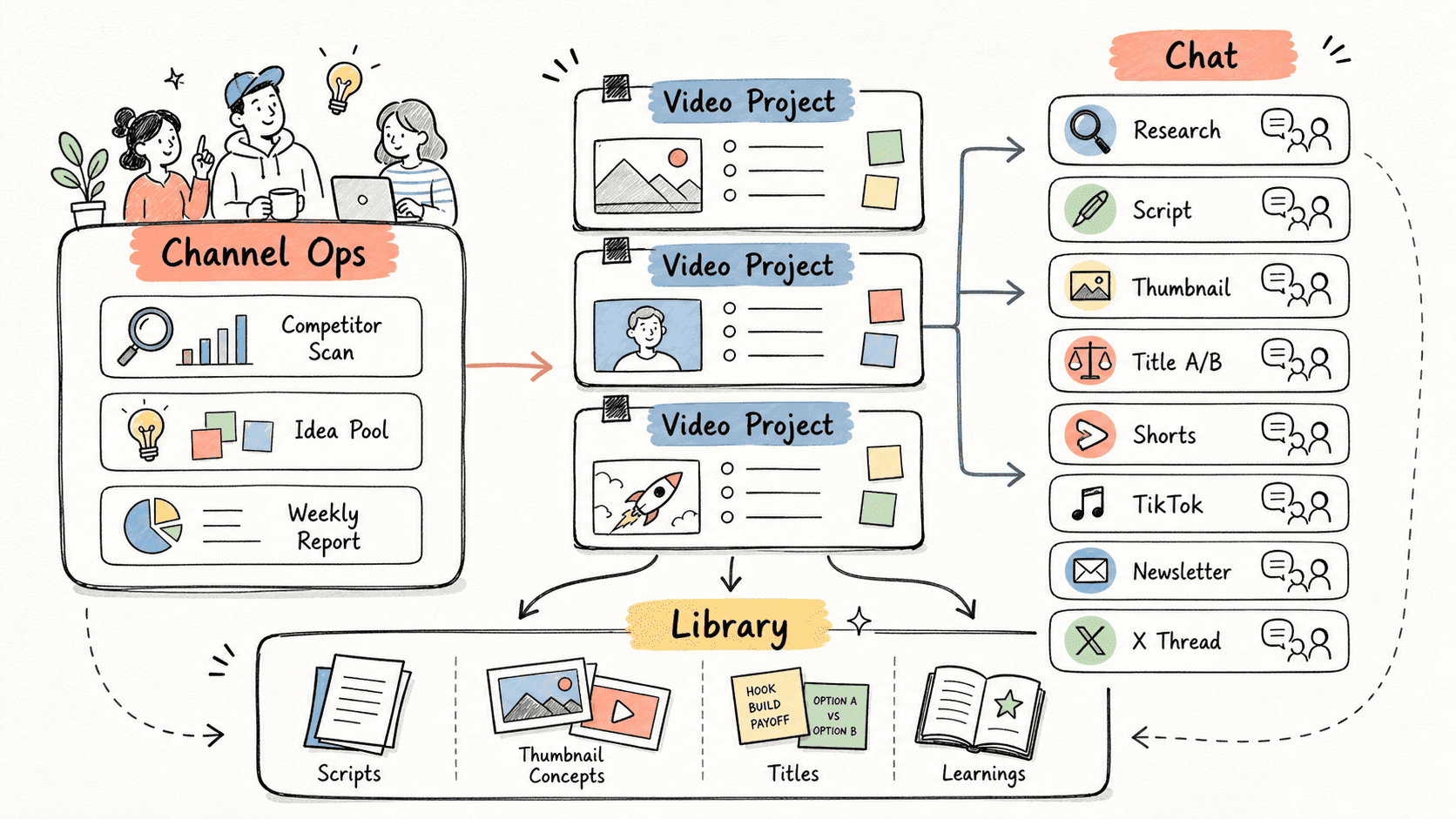
Команде канала нужна надежная рабочая система, в которой контекст проекта, еженедельная аналитика, производство видео и дистрибуция собраны в одном месте.
Kollab объединяет весь канал в Space, регулярные задачи держит в проекте Channel Ops, а для каждого видео создает отдельный проект с чатами под поиск информации, сценарий, обложки, заголовки и адаптацию контента.
Прочитайте процесс целиком, а затем подставьте свои роли, источники и результаты.
Соберите каналы конкурентов, комментарии, тональность бренда и общую базу знаний в одном общем Space.
Разворачивайте выбранную идею в проект выпуска с профильными чатами под сбор материалов, сценарий, обложки, заголовки и дистрибуцию.
Переносите готовые сценарии, рабочие шаблоны заголовков, брифы обложек и выводы после публикаций в библиотеку канала для следующих циклов.
Я хочу настроить в Kollab регулярный процесс для YouTube-канала.

Канал:
- Название: [название канала]
- Ниша: [AI-инструменты / бизнес и стартапы / финансы / бьюти / гейминг / другое]
- Целевая аудитория: [кто смотрит этот канал]
- Тональность бренда: [четкая, прикладная, развлекательная, аналитическая, от первого лица и т. д.]
- Каналы конкурентов: [канал 1], [канал 2], [канал 3]

Создайте план работы на неделю:
1. Изучите каналы конкурентов и найдите 5 тем на эту неделю.
2. Превратите эти темы в 10 идей для видео с описанием зрителя, хука, ракурса и актуальности.
3. Выберите 3 сильнейшие идеи и составьте план производства для каждой.
4. Для первого видео создайте отдельные чаты под фактуру, сценарий, концепт обложки, варианты заголовков, версии для Shorts, TikTok, email-рассылки и треда в Twitter.
5. Сохраните голос канала, заметки об аудитории и чек-лист выпуска, чтобы использовать их в будущих чатах.
Kollab помогает сфокусироваться на отдельной задаче и сохраняет весь контекст канала под рукой.
| Поэтапный процесс | В Kollab | |
|---|---|---|
| Контекст канала | Голосовые заметки, инсайты об аудитории и списки конкурентов хранятся в документах, чатах и личной памяти. | Пространство Space открывает контекст канала каждому проекту и чату. |
| Еженедельное планирование | Специалисты вручную просматривают каналы, копируют ссылки и собирают список тем перед каждой планеркой. | Чаты Channel Ops работают по расписанию и превращают внешние сигналы в готовую базу идей. |
| Производство видео | Анализ темы, сценарии, обложки, заголовки и адаптация материалов распределены по разным сервисам. | Единый проект объединяет все рабочие чаты вокруг общей темы и исходных материалов. |
| Накопление опыта | После публикации выводы фиксируются отдельно от подготовки следующего выпуска. | Готовые материалы и заметки сохраняются в библиотеке, поэтому каждый новый цикл опирается на проверенный контекст. |
| Общее время | Работа в отдельных приложениях и переписках | Единый штаб канала со связанными процессами |
Проект ролика формирует готовую базу решений, черновиков и материалов для дистрибуции с возможностью повторного использования.
Тема
Сценарий
Креатив
Дистрибуция
Откройте страницы связанных возможностей и посмотрите, какие слои продукта и инструменты делают этот сценарий повторяемым для команды.
Планируйте выпуски, пишите сценарии, готовьте обложки и адаптируйте каждое видео под разные платформы в едином центре канала.
Скопируйте промпт настройки в Kollab, замените плейсхолдеры на контекст своей команды и запустите его как задачу, которую можно проверить прямо в рабочем пространстве.
Еженедельный пакет материалов для YouTube: 5 тем на основе конкурентов, 10 идей видео, 3 кандидата на съемку, производственный план выпуска, бриф сценария, бриф обложки, список вариантов заголовков и план адаптации для Shorts, TikTok, рассылки и X.
Нет. Процесс сначала готовит черновики, брифы, артефакты или обновления базы данных для проверки — команда одобряет результат до того, как что-либо будет опубликовано или изменено.
Планируйте стратегию канала, выпускайте видео и собирайте выводы в едином центре управления.
Запустить →